
Set up and use loyalty points
Turn on the loyalty program, set how many points clients earn per ₹100, add yearly spending slabs and bonuses, and redeem points on a bill.
- Who can use it
- Anyone with "View customers" can open Loyalty & Rewards; billing staff redeem points on bills
- Where to find it
- Customers & Loyalty → Loyalty & Rewards → Loyalty Settings
The loyalty program rewards clients with points every time they pay for services. Points can later be used as money off a bill, at 1 point = ₹1.
What this feature does
- Clients earn points on the money they pay on a service bill.
- The earning rate can rise as a client spends more in a year (Annual Spending Slabs).
- Bonus points can be given on the first visit, as a welcome bonus and on the client's birthday.
- Points can be redeemed on a later bill, up to half of the client's balance at a time.
Who can use it
The Loyalty & Rewards page, including Loyalty Settings, opens for anyone with View customers. Points are redeemed at billing by anyone who makes bills.
Where to find it
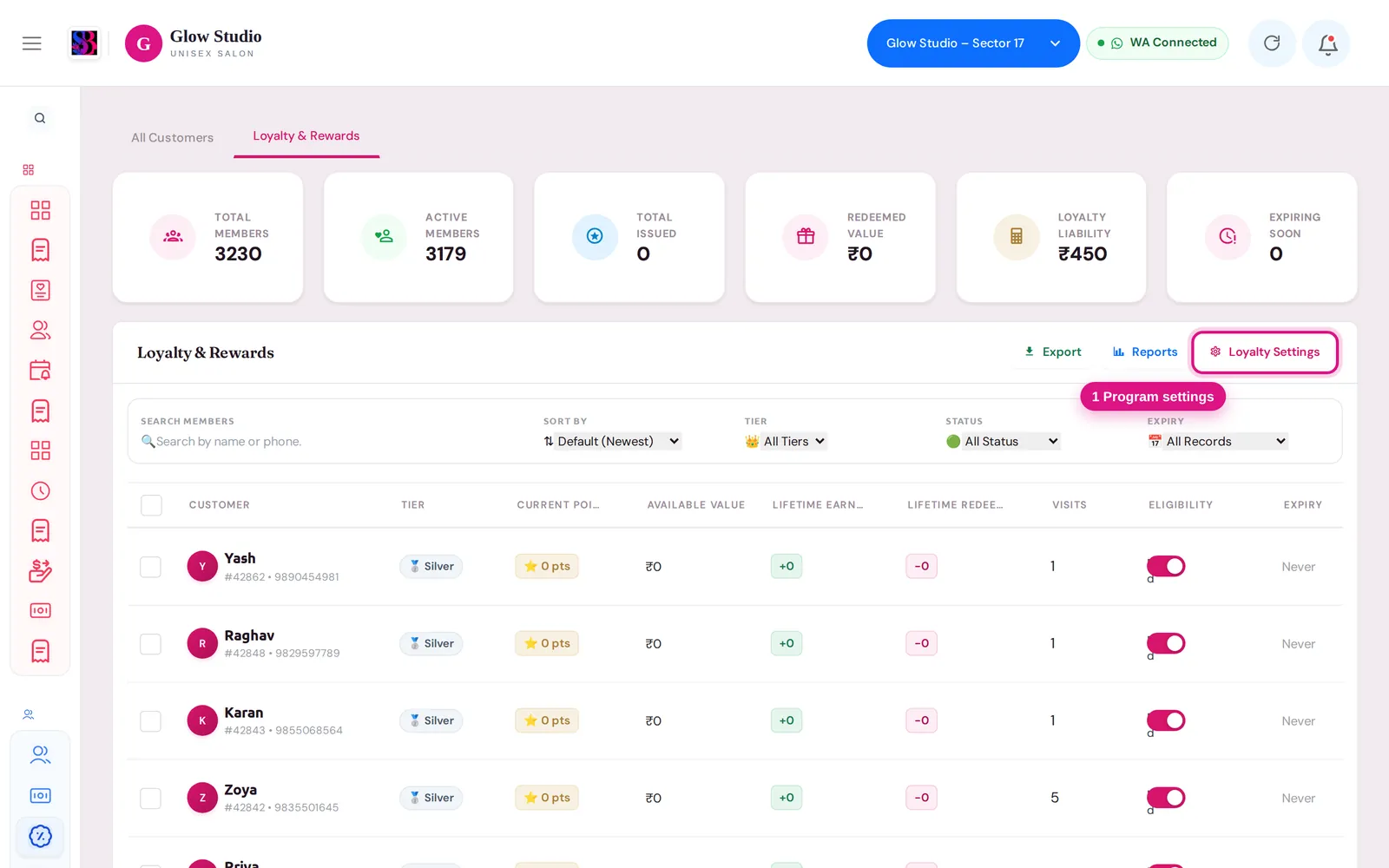
Go to Customers & Loyalty → Loyalty & Rewards. Click Loyalty Settings at the top right to change the rules. From a customer profile, click Loyalty Points ↗ to open that client's points.
How to use it
Set up the program
- Click Loyalty Settings.
- Turn on Enable Loyalty Program. When it is off, nobody earns or redeems, but existing points and history stay safe.
- In Earning Rules, set Points per ₹100 Spent, Min Bill to Earn (₹), Max Points per Bill and Round Off Points (Round Nearest, Round Down or Round Up).
- In Redemption Rules & Limits, set Min Points to Redeem and choose whether to Redeem on Services Only.
- In Bonus Rules, enter Welcome Bonus Points, First Visit Points and Birthday Bonus Points.
- In Eligible Categories, choose which sales earn points. Loyalty for Memberships & Packages is one switch for membership and advance package sales.
- In Annual Spending Slabs, set a points rate for each yearly spend level.
- In Exclude Roles, choose staff roles whose own bills should never earn points.
- Click Save Settings.
Redeem points on a bill
- On Make A Bill, enter the client's mobile number.
- In the 🎁 Loyalty Points card, the screen shows Redeem up to N pts.
- Enter the points to use. Each point takes ₹1 off the bill.
- Save the bill as usual.
Adjust points for many clients
On the Loyalty & Rewards list, tick clients and use Enable Loyalty, Disable Loyalty, Add Bonus, Deduct Points, Reset Points or CSV Export. Changes to points need a reason.
Important rules and limits
| Rule | Detail |
|---|---|
| Redeem limit | At most 50% of the client's available points on one bill. The bill amount does not change this limit. |
| Value | 1 point = ₹1 off the bill. |
| Only fresh money earns | Payments by wallet, membership, package or prepaid coupon don't earn points. Cash, UPI and card do. |
| No points on | Outstanding clearance bills and complimentary bills. |
| Slabs | The rate depends on what the client spent at this salon in the last 12 months. The bill that crosses a slab already earns the higher rate. Earlier bills are not topped up. |
| Staff | A client whose mobile number matches a staff member in an excluded role does not earn. |
| Bill deleted or edited | Points from that bill are reversed. On an edit they are worked out again. |
- With Redeem on Services Only on, points cannot be used on a membership sale, a package sale or an outstanding payment.
- Product bills do not earn points.
Common problems
"You can redeem at most N points on this bill"?
You entered more than half of the client's points. Lower the number to the limit shown.
"Minimum points redemption is N points"?
The client has fewer points than Min Points to Redeem, or you entered fewer. Change the amount, or lower the minimum in Loyalty Settings.
"The Loyalty Program is turned off for this salon"?
Turn on Enable Loyalty Program in Loyalty Settings.
The client paid but got no points?
Check that the program is on, that loyalty is enabled for the client, and that the bill was paid in cash, UPI or card. Wallet and package payments don't earn. Also check Min Bill to Earn (₹).
Last updated