
Memberships, Packages & Coupons
Delete a prepaid coupon sale
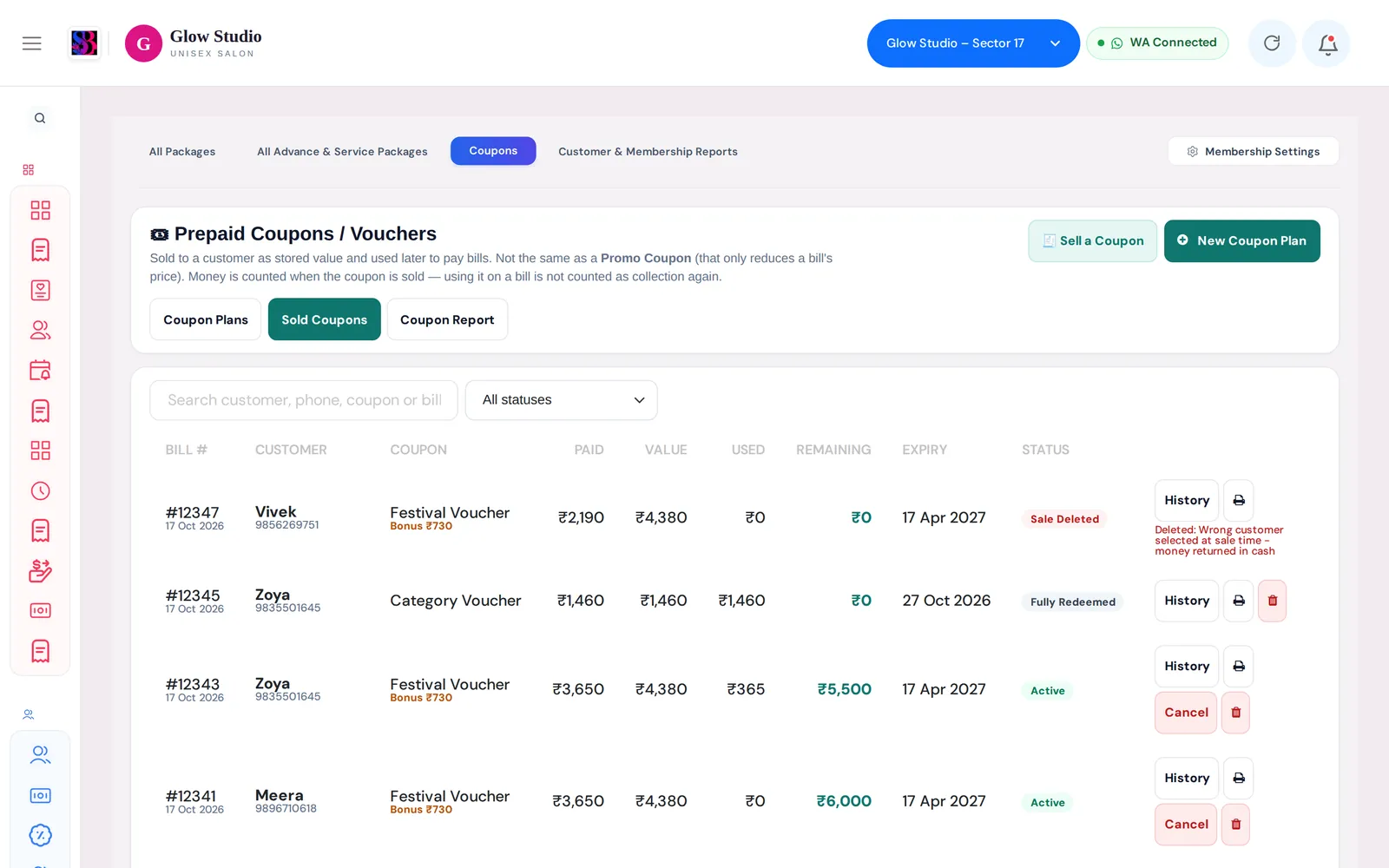
Reverse a coupon sold by mistake. Owner/Admin only: removes the collection from reports, sets the balance to ₹0 and keeps a full record.
- Who can use it
- Owner/Admin only
- Where to find it
- Memberships & Packages → Coupons → Sold Coupons → 🗑; Home Dashboard → Coupon Sales → ⋮
If a prepaid coupon was sold by mistake (wrong customer, wrong plan, entered twice), the Owner/Admin can delete the sale. This reverses the money as if the sale never happened, while keeping the record for audit.
What this feature does
When you delete a coupon sale:
- All payments taken for that coupon are removed from the Dashboard, the payment-mode totals and the Analytics and Management reports.
- The coupon balance becomes ₹0, so it can no longer pay any bill.
- The coupon stays in Sold Coupons with the status Sale Deleted, plus who deleted it, when and why.
- The deletion is written to the Audit Trail and the Activity Feed ("Prepaid Coupon Sale Deleted").
Delete or Cancel?
| Delete coupon sale | Cancel coupon | |
|---|---|---|
| Use when | The sale itself was a mistake | The sale was real, but the coupon must stop working |
| Money collected | Reversed — removed from collections and reports | Stays counted |
| Remaining value | Becomes ₹0 | Can no longer be used |
| Who | Owner/Admin only | Staff with Manage Prepaid Coupons |
| Reason | At least 20 characters | At least 10 characters |
Who can use it
Only the Owner/Admin. This is a role rule, not a permission: Co-owners, Managers and other staff cannot delete a coupon sale, and the delete button is not shown to them.
Where to find it
- Memberships & Packages → Coupons → Sold Coupons: the red bin button on the coupon's row.
- Home Dashboard → Coupon Sales feed: open the ⋮ menu on a coupon sale card and choose ❌ Delete Coupon Sale.
How to use it
- Open Sold Coupons and find the sale. Search by customer, phone, coupon or bill number.
- Click the bin button on that row.
- Check the details in the box: Customer, Coupon, Amount Paid, Coupon Value, Used on bills and Sold on.
- Type the Reason for deleting (at least 20 characters). The counter turns green when it is long enough.
- Confirm. You will see a message such as "Coupon sale deleted — ₹5,000 collection reversed and the coupon balance removed."
Important rules and limits
- A coupon that has been used on any bill cannot be deleted. The box shows how much was used and the bill numbers. First correct those bills: editing or deleting a bill returns its amount to the coupon. When Used on bills is ₹0, you can delete the sale.
- A sale that is already deleted cannot be deleted again.
- Deleted sales are not counted in "Coupons sold" figures.
Common problems
I do not see the bin button?
You are not signed in as the Owner/Admin, or the sale is already deleted. Ask the Owner/Admin.
"This coupon has already been used on bills"?
Open each bill listed, edit or delete it so the coupon amount goes back, then delete the sale.
"Only the Owner / Admin can delete a coupon sale"?
Your role cannot do this. Use Cancel if you have Manage Prepaid Coupons, or ask the Owner/Admin.
Last updated