
Send staff their daily WhatsApp report
Turn on the nightly WhatsApp performance report for all active staff, switch it off for one person, send a report by hand and check what was sent.
- Who can use it
- Owner/Admin and Co-owner (master switch); Owner/Admin, Co-owner and Manager (individual switch, manual send, history)
- Where to find it
- Team Management → Staff → WhatsApp Daily Reports
Every night SalonBill can send each active staff member a short WhatsApp message with a link to their own performance report for the day.
What this feature does
Between about 10:00 pm and 11:30 pm, each eligible staff member gets a message like this from your salon's WhatsApp number:
> Hi Aarav, 👋 Your daily performance report for 21 Oct 2026 is ready. 📊 Clients attended 💰 Sales & performance 🎁 Membership / Package / Coupon sales 💵 Incentive details — View your report: (link) — Glow Studio
The link opens their personal report page — no login or password needed.
Who can use it
| Action | Who |
|---|---|
| Master switch (all staff ON/OFF) | Owner/Admin, Co-owner |
| Switch one person on or off, send manually, view history | Owner/Admin, Co-owner, Manager |
Where to find it
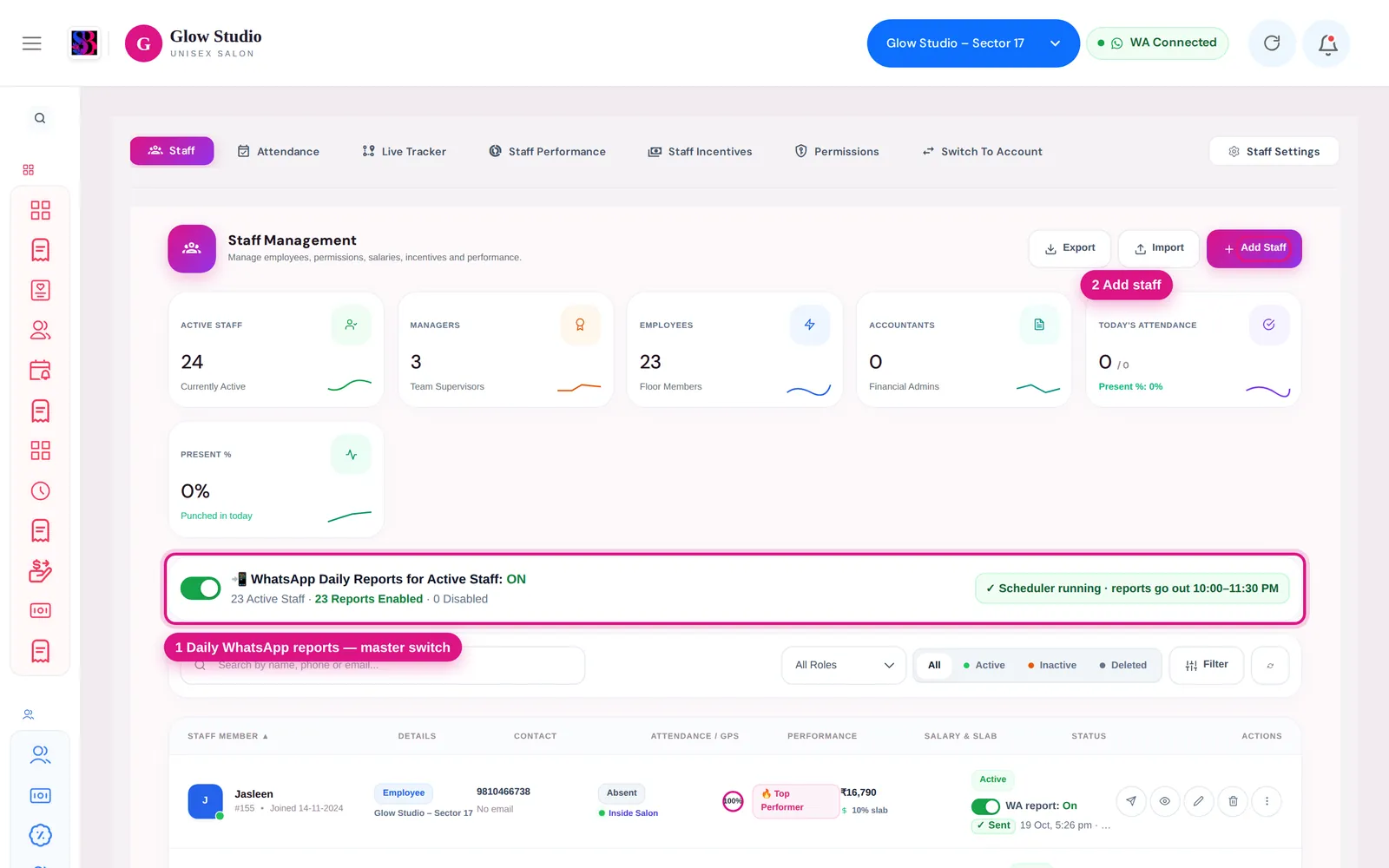
Team Management → Staff. The master bar is above the staff list. Each staff row has a WA report: On/Off switch and the last result under the status.
How to use it
- Make sure WhatsApp is connected for the outlet (Connect WhatsApp).
- Turn on WhatsApp Daily Reports for Active Staff. The bar shows a summary such as "24 Active Staff · 23 Reports Enabled · 1 Disabled".
- To leave one person out, switch their WA report to Off. Everyone else keeps getting the report.
- To send a report now, click the green Send WhatsApp Summary button (paper-plane icon) on the staff row and choose Today, Yesterday, Last 7 Days or Last 30 Days.
- Click a row's report status to see the history: each send, whether it was Sent, Failed, Missed or Skipped, and the reason.
Who receives it
A staff member gets the nightly report only when all of these are true:
- The master switch is ON and their own switch is On (new staff are On by default)
- Their status is Active and they are not deleted or suspended
- They are an Employee or Manager still assigned to this outlet
- A valid 10-digit mobile number is saved on their staff profile
Inactive, deleted and ex-employees never receive it.
Important rules and limits
- The message is sent from the outlet's own connected WhatsApp number.
- Turning the master switch OFF stops tonight's pending reports for everyone. Turning it back ON queues them again.
- A report that could not be sent by about 4 hours after its time is marked Missed — staff never get a report in the middle of the night.
- If the bar shows "Automatic sending is not running on the server", the nightly sending service is not running. Manual sends still work; contact support.
Common problems
A staff member did not get the report?
Open their history. Failed shows the WhatsApp error; Skipped shows why they were left out (switch off, no mobile, inactive). See Staff not getting the daily report.
The summary says "no mobile"?
Add a 10-digit mobile number in the staff member's profile in Team Management → Staff.
Last updated