
Offers, Spin & Win & Marketing
Apply a Spin & Win reward on a bill
Redeem a customer's Spin & Win voucher at billing. Rewards apply on regular/MRP-priced services only, need the minimum bill and cannot be combined.
- Who can use it
- Anyone who can make service bills
- Where to find it
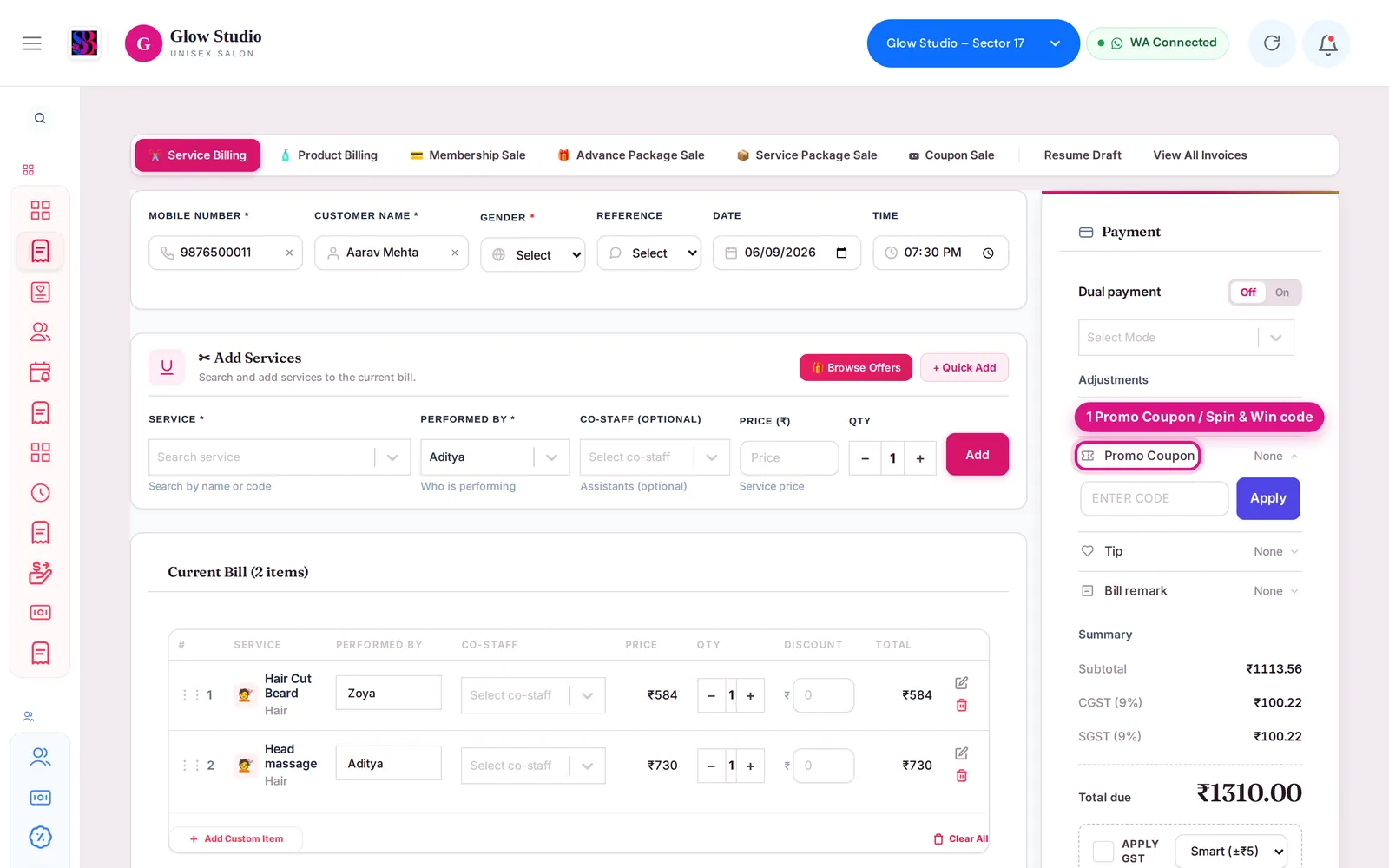
- Make A Bill → Promo Coupon (🎡 Spin offer → Apply)
When a customer who won on the Spin & Win wheel comes in, their voucher is applied on the bill in one click. SalonBill checks every rule automatically, so staff do not have to work out what is allowed.
What this feature does
On Make A Bill, once you select the customer, an open reward shows as a 🎡 card: Spin offer: (name), a short summary, the expiry date and the voucher code (for example SPIN4K2X9Q). Apply puts it into the Promo Coupon box and works out the discount. When the bill is saved, the voucher is marked as redeemed.
Who can use it
Anyone who can make service bills.
How to use it
- Open Make A Bill and select the customer who won the reward.
- Add the services.
- On the 🎡 card, click Apply. You can also type the code in Promo Coupon → Enter code → Apply.
- Read the orange note: the reward amount, "on regular-price services ₹…", any Not applied to: … lines, and the rule.
- Take payment and save.
The rules
| Rule | What it means on the bill |
|---|---|
| Regular/MRP price only | The reward is worked out only on services billed at their normal catalogue price. Combo services, package/membership services, Current Offer services, ₹0 lines, services priced below MRP and services with their own discount are left out. |
| Not combinable | You cannot add another bill discount or special discount on top. The bill's discount can be the reward amount only. |
| Minimum bill | The whole bill must reach the reward's minimum, e.g. "This spin offer needs a bill of ₹1,500 or more". |
| Validity | The voucher works only until its expiry date. |
| Right customer | The voucher works only for the customer who won it. |
| One use | After the bill is saved, it is used up. Deleting the bill makes it usable again. |
- Mixed bills: if some services are regular-price and some are discounted, the reward applies only to the regular-price part.
- Free service rewards (for example Free Haircut) need that service on the bill, at its regular price.
- Free gift rewards take ₹0 off — hand over the gift; saving the bill marks the voucher as used.
- If you change services, prices or discounts after applying, SalonBill checks the reward again. If it no longer fits, it is removed and the reason is shown.
- On a Current Offer bill, the card says Not with this offer unless the Owner allowed coupons on offers.
Common problems
"Spin & Win applies on regular/MRP-price services only — every service on this bill is already discounted / on offer / combo / package"?
Remove the other discount, or add a regular-price service.
"Spin & Win cannot be combined with another discount"?
Remove the extra bill discount or special discount, or remove the spin offer.
"Add … to the bill to use this spin offer"?
The reward is for a specific service. Add it to the bill.
"This spin offer has expired" / "was already used" / "was cancelled"?
The voucher can no longer be used. The customer can spin again for a new reward.
"This spin offer belongs to a different customer"?
Select the customer who won it.
"The customer has not confirmed this spin yet"?
Ask the customer to tap 🎁 Claim This Offer on their spin page, then apply again.
"Spin offers are blocked for this customer"?
The Owner/Admin has blocked this customer's spins.
Last updated