
Memberships, Packages & Coupons
Sell and use prepaid coupons (vouchers)
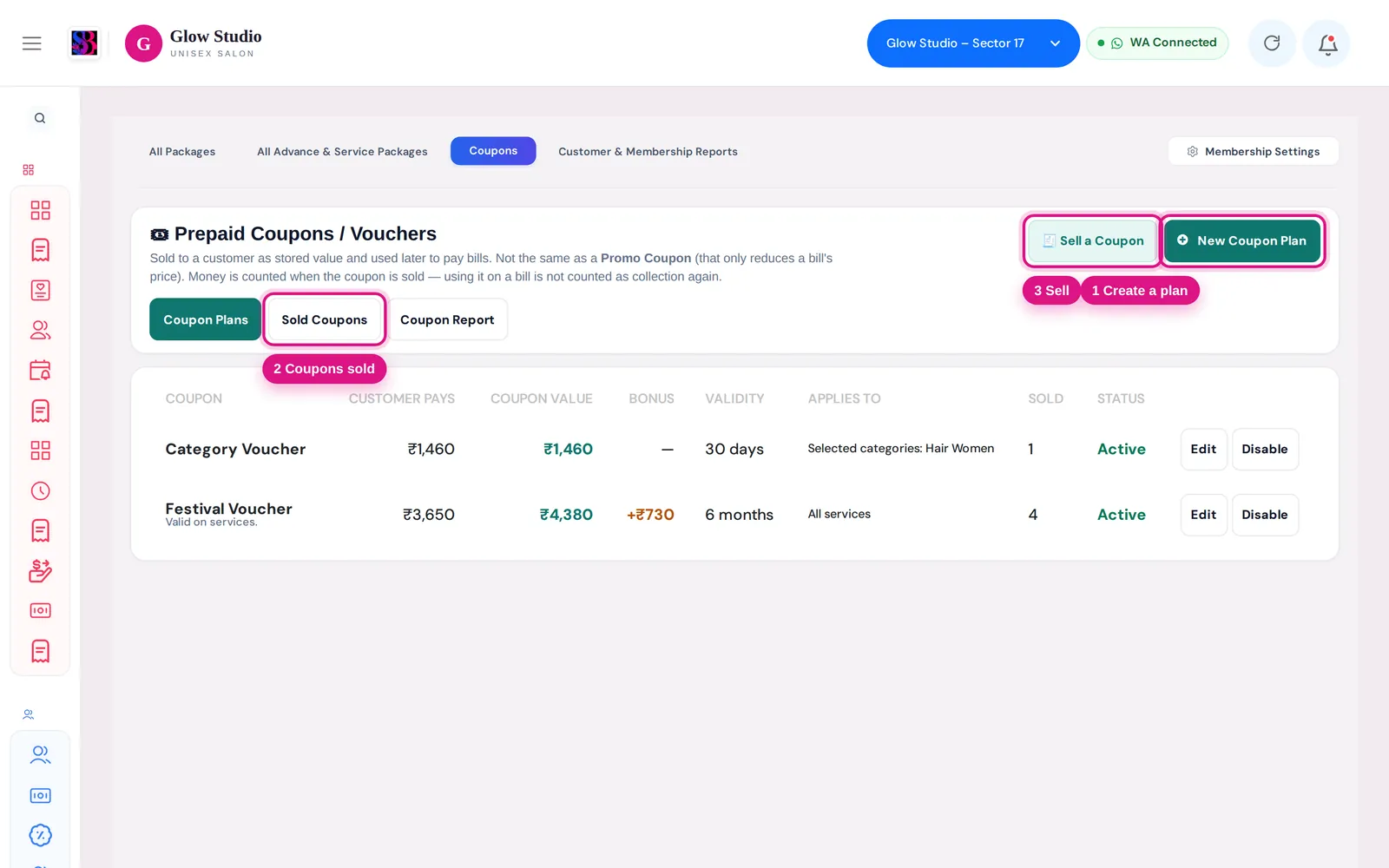
Create prepaid coupon plans like Pay ₹5,000 Get ₹6,000, sell them with full or part payment, and use the balance to pay bills later.
- Who can use it
- Owner/Admin and Co-owner always; staff with "Manage Prepaid Coupons", "Sell Prepaid Coupons", "Redeem Prepaid Coupons" or "View Prepaid Coupon Reports
- Where to find it
- Memberships & Packages → Coupons; Make A Bill → Coupon Sale
A prepaid coupon is a voucher the customer buys now and spends later. The customer pays a price (for example ₹5,000) and gets a coupon value that can be higher (for example ₹6,000). The balance pays for future bills, in one go or bit by bit.
Who can use it
| Permission | Lets the person… | Given by default to |
|---|---|---|
| Manage Prepaid Coupons | Create and edit plans, cancel a coupon | Owner/Admin, Co-owner |
| Sell Prepaid Coupons | Sell coupons, collect pending payments | + Manager |
| Redeem Prepaid Coupons | Use a coupon to pay a bill | + Manager, Accountant, Employee |
| View Prepaid Coupon Reports | See the Coupon Report | Owner/Admin, Co-owner, Accountant |
Change these in Team Management → Permissions.
Where to find it
Memberships & Packages → Coupons has three tabs: Coupon Plans, Sold Coupons and Coupon Report. Sell from 🧾 Sell a Coupon or Make A Bill → 🎟 Coupon Sale.
How to use it
Create a coupon plan
- Click New Coupon Plan.
- Enter the Coupon name, Customer pays ₹ and Coupon value ₹. If the value is higher, the Bonus Value is shown.
- Set Valid for (a number of Days or Months).
- Choose Applies to: All services, Selected services or Selected categories.
- Add Description / Terms, keep Active (available to sell) ticked and save.
Sell a coupon
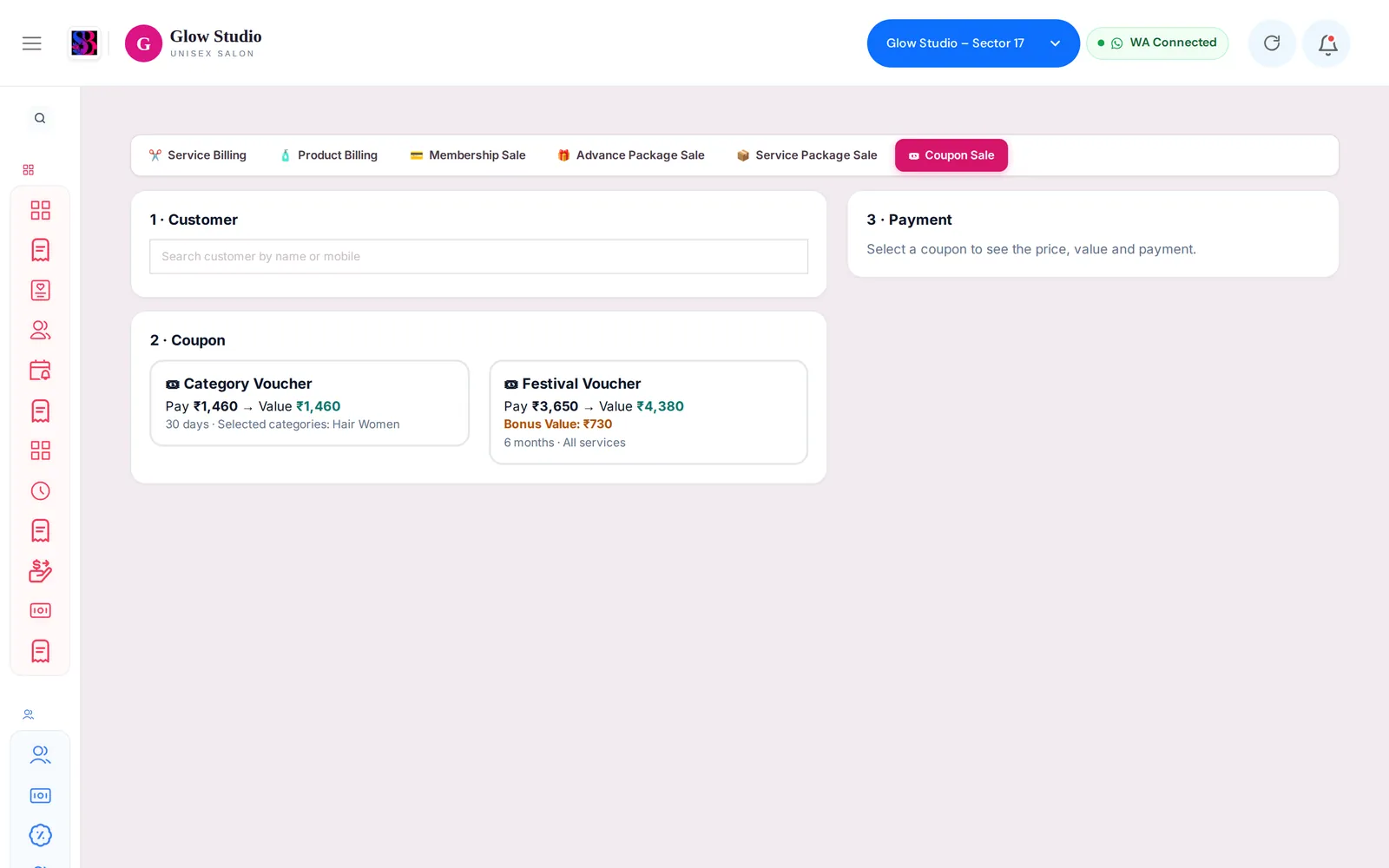
- Open Make A Bill → 🎟 Coupon Sale.
- 1 · Customer — search by name or mobile, or click + Add as new customer.
- 2 · Coupon — click the plan card.
- 3 · Payment — enter the amount received and the payment mode (you can split modes).
- Click Save & sell coupon. You can then Print receipt.
Use a coupon on a bill
- On Make A Bill, select the customer. A 🎟 Prepaid Coupon available box shows the balance and expiry.
- Click Use coupon. If the balance covers the bill, the whole bill is paid by the coupon. If not, Dual payment opens with the coupon amount plus the rest to collect.
- Save the bill. The invoice shows Coupon Used and Coupon Balance Left.
Important rules and limits
- A coupon can be paid for only with real money (cash, UPI, card and so on), never with wallet, package or another coupon, and never more than its price.
- Part payment: the coupon unlocks value in proportion to what was paid. For example, ₹2,000 paid on a ₹5,000 → ₹6,000 coupon unlocks ₹2,400. Collect the rest from Sold Coupons → Collect.
- The coupon works only for its own customer, at the outlet where it was sold, before its expiry, and on the services it applies to.
- One prepaid coupon per bill. Coupons are not used on product bills.
- On a bill with a Current Offer, the coupon box is hidden unless the Owner allows wallet/package payments on offers.
- Money is counted when the coupon is sold. Using it on a bill is not counted again as collection.
- Editing or deleting a bill returns the used amount to the coupon.
- Cancel (Manage permission, reason of at least 10 characters) stops the remaining value from being used. It does not refund money.
Sold Coupons and reports
Sold Coupons lists each sale with Bill #, Paid, Value, Used, Remaining, Expiry and Status (Active, Fully Redeemed, Expired, Cancelled, Sale Deleted). Use History to see every movement and the printer icon for the receipt. Coupon Report shows coupons sold, money collected by payment mode, value and bonus issued, redeemed on bills and expired unused value.
Common problems
"Prepaid Coupon balance is ₹… only"?
Part of the coupon is still locked or used. Take the rest by another mode with Dual payment.
The coupon box does not appear?
Check the right customer is selected, the coupon is not expired and the bill is not a Current Offer bill. See Coupon or reward not applying.
Last updated