
Customer wallet and WhatsApp balance summary
See a client's wallet, memberships, packages, coupons and points, understand locked wallet money, and send the balances to the client on WhatsApp.
- Who can use it
- Viewing: "View customers"; Send on WhatsApp: Owner/Admin, Co-owner, Manager or "Send Balance Summary on WhatsApp
- Where to find it
- Customers & Loyalty → All Customers → customer profile → Membership & Wallet → Send on WhatsApp
A client's wallet holds the money they can spend at your salon, for example the value they received when they bought a membership. From the customer profile you can see every balance and send the client a clear summary on WhatsApp.
What this feature does
The Membership & Wallet card on the customer profile shows:
- Wallet Balance, with Bill with Wallet when there is money to use
- Loyalty Points
- every membership, advance package and service package, with purchase date, expiry date, remaining value and sessions left
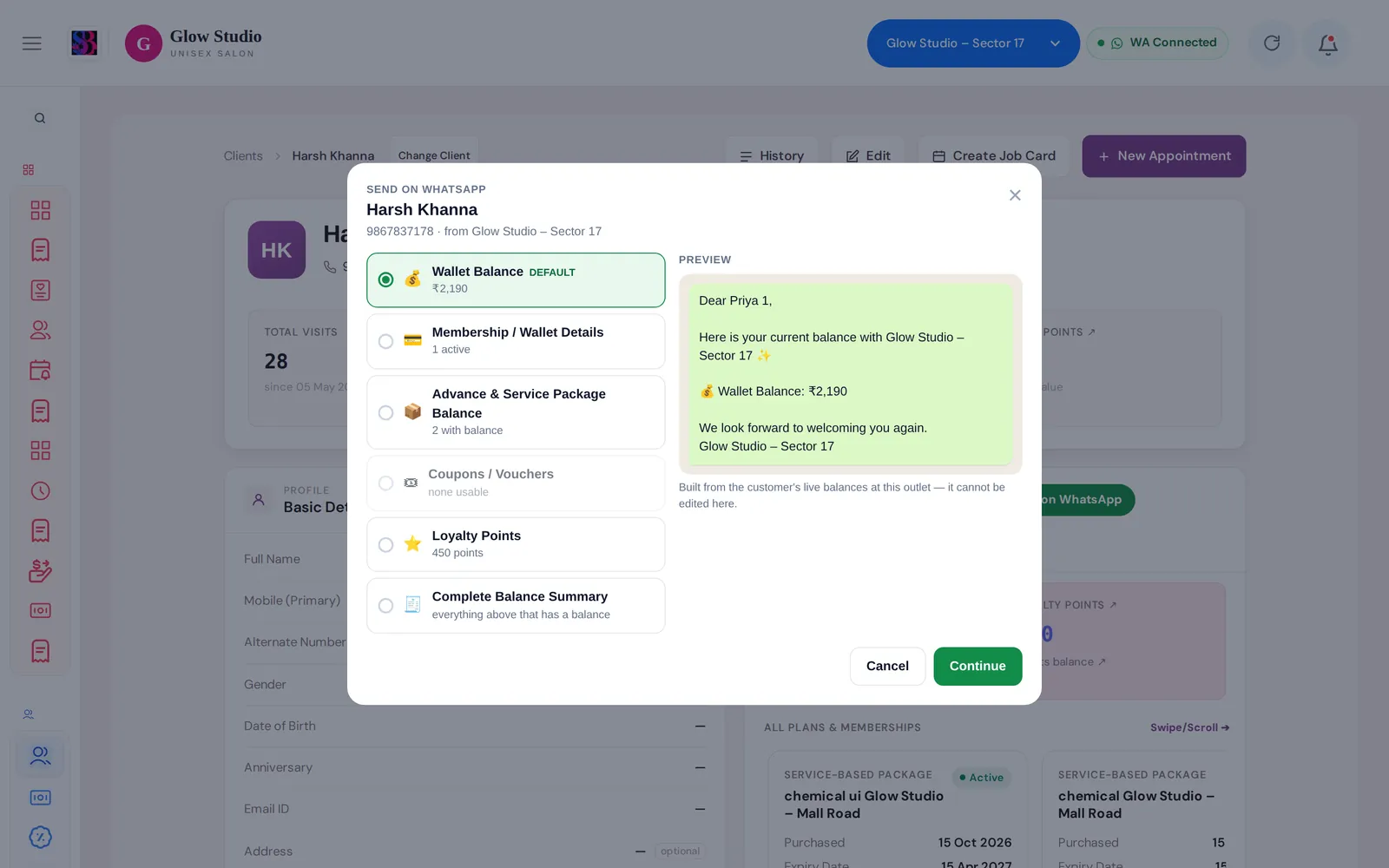
The 💬 Send on WhatsApp button sends the client a message built from their live balances at this outlet. You choose what to send:
| Option | What the message contains |
|---|---|
| Wallet Balance (default) | Current wallet amount. If the membership behind it has expired, the message says so. |
| Membership / Wallet Details | Each active membership, its benefit and validity, and the wallet available |
| Advance & Service Package Balance | Packages with value or sessions left |
| Coupons / Vouchers | Prepaid coupons with a usable balance and their validity |
| Loyalty Points | The points balance |
| Complete Balance Summary | Everything above that has a balance |
Options with nothing to show are greyed out, for example "none active".
Who can use it
- Anyone with View customers can see the balances.
- Send on WhatsApp: Owner/Admin, Co-owner and Manager by default, or anyone given Send Balance Summary on WhatsApp. This permission only sends a message. It cannot change any balance.
Where to find it
Open Customers & Loyalty → All Customers, open the client, and find the Membership & Wallet card. The 💬 Send on WhatsApp button is in its header.
How to use it
- Open the customer profile.
- Click 💬 Send on WhatsApp.
- Pick what to send. The Preview on the right shows the exact message. It cannot be edited.
- Click Continue.
- Check the customer, WhatsApp number, what is being sent and the sending number, then click Confirm & Send.
- The result shows Sent, Sent — not yet confirmed, Not delivered or Not sent, with the reason. Click Try again if needed.
The message goes from your outlet's own WhatsApp number. It is saved on the client's timeline with your name.
Important rules and limits
Locked wallet money
If the client still owes money on a membership, part of the wallet is locked until it is paid. At billing you see 🔒 Membership payment pending — redemption limited to amount paid and Wallet unlocked now: ₹… · Locked: ₹…. The locked part grows with the unpaid share of the membership. Once the outstanding is cleared, the full wallet can be used. See Pending outstanding.
Expired memberships
- A Manager cannot use wallet money that belongs only to an expired membership.
- The Owner can override this, but must give a reason of at least 20 characters. The membership stays expired.
- Cash, UPI and card payments are never blocked for such a client.
Sending rules
- Nothing is sent until you click Confirm & Send.
- The same summary cannot be sent again within a few seconds, so double clicks don't send twice.
- The client must belong to the outlet selected in the top bar.
Common problems
"This customer has no valid mobile number saved"?
Edit the profile and add the client's 10-digit mobile number, then try again.
"WhatsApp is not connected for this outlet"?
Connect WhatsApp in Settings → WhatsApp Integration. See Connect WhatsApp.
"WhatsApp messages are switched off for this outlet" or "WhatsApp is disconnected"?
Nothing was sent. Switch WhatsApp back on or reconnect it, then send again. See WhatsApp messages not sending.
"This summary was just sent. Wait a moment before sending it again."?
The same summary was sent a moment ago. Wait and try again only if the client did not receive it.
I don't see the Send on WhatsApp button?
Ask the Owner/Admin to turn on Send Balance Summary on WhatsApp for your role.
Last updated